Categories
Manage the category tree that organizes products and services, from Admin → Categories.
What categories organize
Categories group products and services for browsing on the public site — things like "Clothing" or "Woodworking." Every category is one of two types:
- Product — for organizing shop products
- Service — for organizing shop services
Categories can be nested one level deep: a top-level category can have subcategories, and a category's parent must be the same type (a Product category can't be nested under a Service category).
Where to find it
Go to Categories in the admin sidebar (/admin/categories). This page is admin-only.
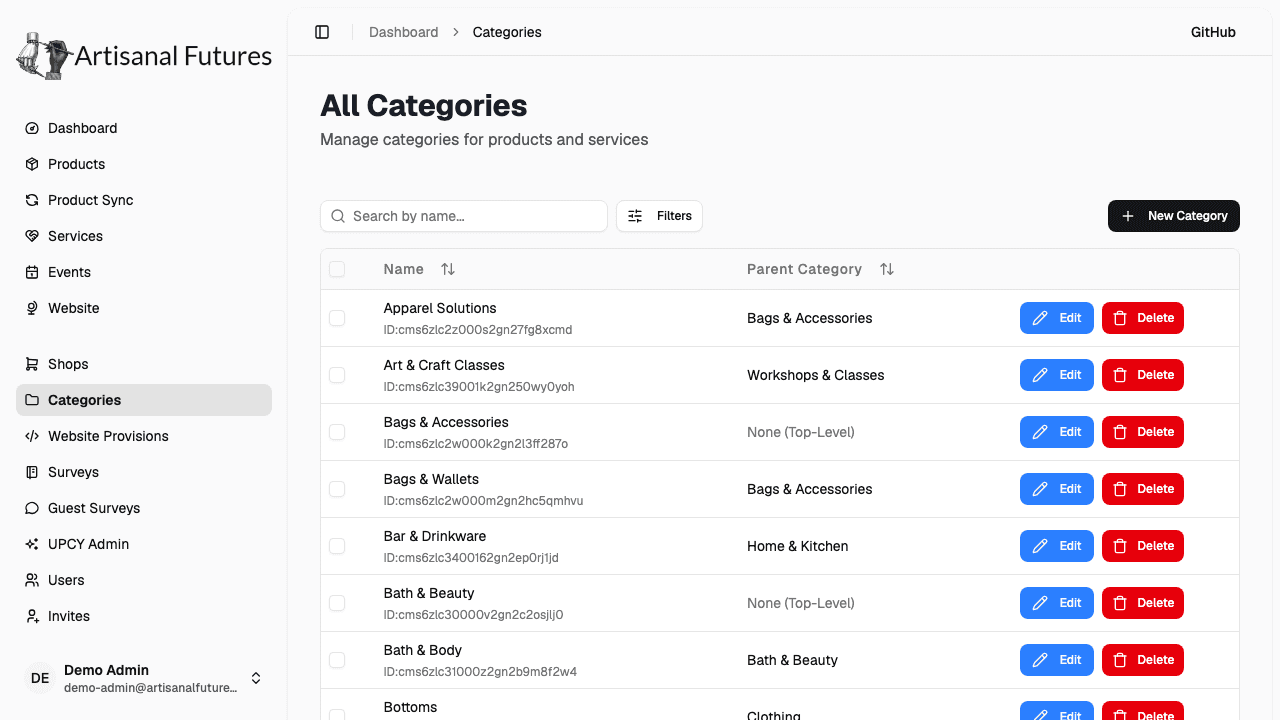
The categories table
Each row shows the category's Name, its Parent Category ("None (Top-Level)" if it has none), and Edit / Delete actions.
Creating or editing a category
- Click into a category to edit it, or use the new-category form to create one.
- Set the Category Name.
- Optionally pick a Parent Category — only top-level categories of the same type are offered.
- Set the Category Type (Product or Service).
The type can only be set when a category is created — it's locked (disabled) once the category exists. If a category is the wrong type, delete it and recreate it rather than trying to change its type.
Deleting categories
Delete a single category from its edit page, or select multiple rows in the table and use the bulk Delete action. Either way, you'll be asked to confirm.
Deleting a category also deletes its subcategories — this cascades automatically. It does not delete the products or services that were filed under it; they simply lose that category tag.
Related
Categories are used to tag products and services throughout the platform, and to build the browsing navigation on the public site.